
CPSC 110-08: Computing on Mobile Phones
Spring 2011
Debugging Tips
An important part of developing an app is finding and fixing bugs that
may come up during the development process. Generally, there are two
types of errors that can occur, syntax and semantic errors.
Syntax errors are like grammatical mistakes in a
language. In a typical programming language a syntax error would be
something like spelling the name of a variable wrong or using an operator
in the wrong way. For example, it would be a syntax error to try and
divide two strings with an expression like "hello / 2". In
App Inventor it is very difficult to create these kinds of error because
the blocks editor constrains the type of expressions and statements you
can write to those that are syntacticaly legal.
Semantic errors occur when you construct syntactically
correct code that doesn't do what you intend it to do. And there are
an infinite ways to make these kinds of errors. For example, suppose
you wanted to add two numbers and you construc the expression "num1
* num2". This would cause your app to work incorrectly.
Investigating Bugs
Fixing a semantic error in your code requires something like a
criminal investigation employing all of the logic and reasoning and
evidence gathering skills you can marshall. Start investigating!
- Evidence Gathering. The simplest form of evidence gathering is
to run your app and observe its behavior. If it gives a result you don't expect,
that is evidence of a bug.
- Logic is Key. Debugging involves a lot of deductive
logic -- Sherlock Holme's forte. You need to ask
yourself: how, logically, could this bug happen. For example,
suppose your app had this if/else block:
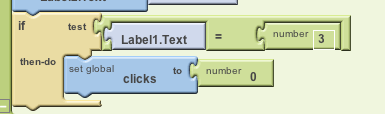
It's supposed to set the global variable clicks to 0,
when Label1.Text = 3. If that doesn't happen --
if clicks is not being set to 0 -- that means that the
condition Label1.Text = 3 is false. That's the only logial
explanation. Right? So you have to figure out how it could be
false???
In this case, you'd have to look and see what
value Label1.Text. Sometimes this is as easy as looking at the app
and observing what Label1.Text is. Sometimes it's not so obvious.
- Closer Inspection. There are features in App Inventor that can help
you observe the inner workings of your app. For example, in the Blocks Editor,
if you right click on block, you can Watch that component and see how it
changes over time. For example, if you watch a counter that's supposed
to keep score in a game, you will see how its value changes over time. This
gives you more evidence to use in your investigation.
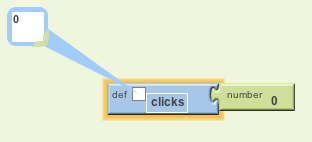
Suppose we apply this technique to take a closer look at Label1 and
we find:
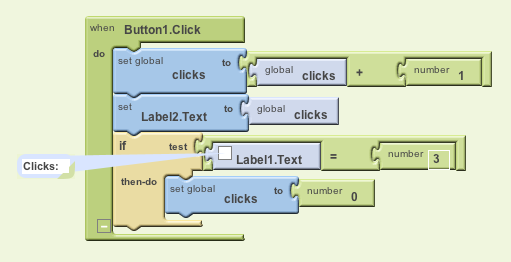
We can now see that we're trying to compare a string, "Clicks:", to
the number 0. This bug was caused by referring to the wrong component
if our Label1.Text = 3 expression. If you read the rest of
this block you can see that we want to refer to Label2.Text not
Label1.Text. We've found the cause of our bug!
- Lesson Learned: This last bug might have been easier to detect if we
used more descriptive variable names. It's easy to forget what "Label1" and "Label2"
are for. It's easier to see that "ClicksLabel" and "ClicksValue" play different roles.
- Debugging is Fun! If you approach debugging like a
detective, it can be fun and rewarding. Endorphins rush into your
neurons whenever you find a bug -- the nastier the bug, the more the
pleasure! Bugs in your code are inevitable. Expert programmers make
semantic errors all the time. Treat their existence as a
challenge. Don't let them get you down.
- Lots of eyes make all bugs shallow! One of the great
benefits of free and open source software (FOSS) is that lots of
people get to read the code. If you're really stumped, have a
classmate take a look at your code and discuss your investigation
together.
- Exercise.
Click DebuggingExample.zip to
download the sourcecode for this example and see if you can fix it.
It's supposed to increment and display the number of clicks each time
the button is clicked. And it's supposed to reset the counter to 0
after 3 clicks.
- App Inventor Bug? App Inventor is a FOSS project, which
means that the App Inventor community collaborates on reporting and
fixing bugs. See
http://code.google.com/p/app-inventor-for-android/issues/detail?id=1265 for an apparent bug
that I reported and that is currently under investigation. Let me know if you find
something that you think is a bug in App Inventor's code!