CS Principles
This activity introduces the main architectural features of an App Inventor program
considered as a digital artifact. It focuses on the following learning objective:
- IA2: The student will see how an App Inventor program functions in terms of its
basic event-driven programming architecture.
Introduction
In this lesson we will focus on the architecture of an App Inventor app.
Rather than looking at the app as a user might -- i.e., in terms of how it looks
and what it does -- we will look at it from a programmer's perspective. We
will look at its internal structure.
App Inventor Structure
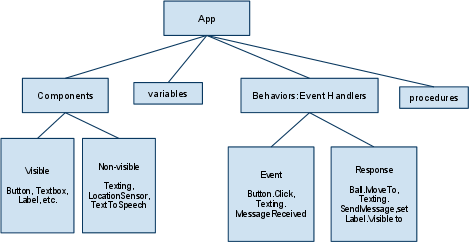
The following figure provides an overview of an App Inventor app.
Components
- The visible components make up the app's user interface.
- Non-visible components include things like the OrientationSensor and the TextToSpeech
component.
- Components are defined by a set of properties which are memory slots that store information about the component.
For example, a Button component has the following properties:

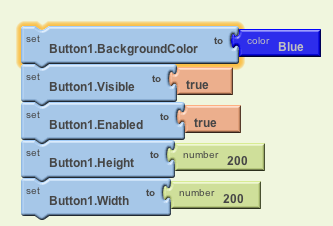
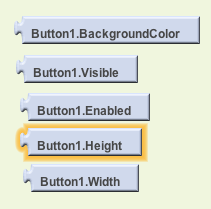
- A component's properties can be set either in the Viewer or in the Blocks Editor using built-in blocks:
| There is a setter block for each property: |
 |
| And there is a getter block for each property: |
 |
Behavior - Event-driven Programming Architecture
- Traditional computer programs followed a pre-set sequence of instructions known as an algorithm.
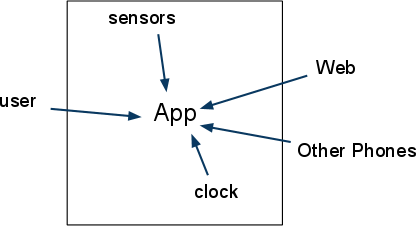
- An App Inventor app reacts to events.
- Events include things like a button-click, the receipt of a text message, movement of the phone in 3-D.
| Event Type | Example |
|---|
| User-initiated event | When the user clicks button1 do... |
| Initialization event | When the app starts do... |
| Timer event | When 20 milliseconds passes do... |
| Animation event | When two objects collide do... |
| External event | When a text is received do... |
|
|
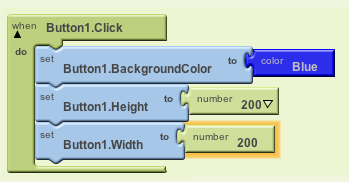
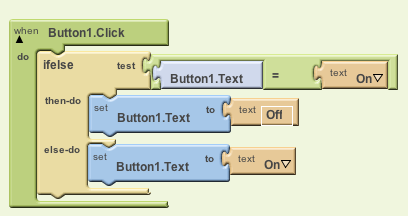
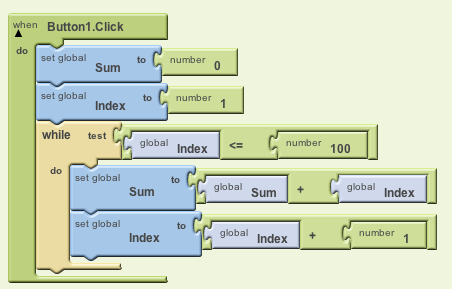
- An App Inventor app is a set of event handlers where the
algorithms are contained in the do slots of event
handlers. The algorithms can contain a simple sequence or selection (if/else) or
repetition (while) structures:
| Sequence | Selection | Repetition |
|---|
 |
 |
 |
Memory and Data
Another important part of an App Inventor app is its memory, which is
where the app's data are stored. There are three different kinds of
memory:
| Kind of Memory | Description | Where to Find It |
|---|
| Properties | Store data associated with some component | Setters and getters in the component's 'drawer' |
| Global Variables | Store data for the whole app | In the My Blocks > MyDefinitions drawer |
| Argument | Store data for an event handler or a procedure | In the My Blocks > MyDefinitions drawer |