R. Morelli
The purpose of this first laboratory project is to give you some hands-on experience editing and compiling a Java program. This will not only familiarize you with the software that will be used in this course but will also elaborate on some of the concepts introduced in this chapter. The objectives of this exercise are
Don't worry that you won't understand all of the Java code in the applet. We'll eventually get to language details in subsequent chapters.
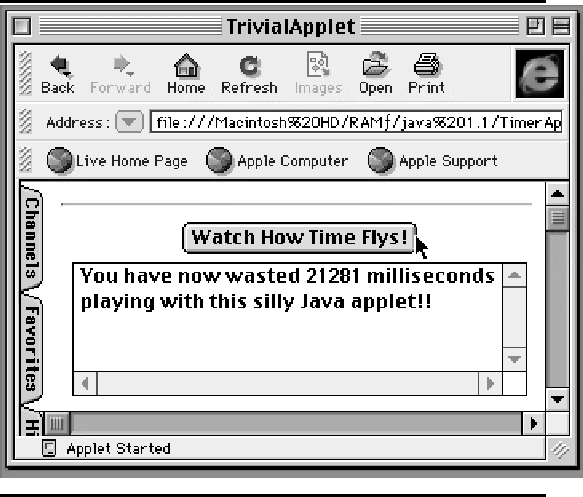
As shown in Fig 1, this applet plays a silly game with the user. Every time the user clicks on the button labeled ``Watch How Time Flys!'' the applet reports how many milliseconds have been wasted since the applet began running.
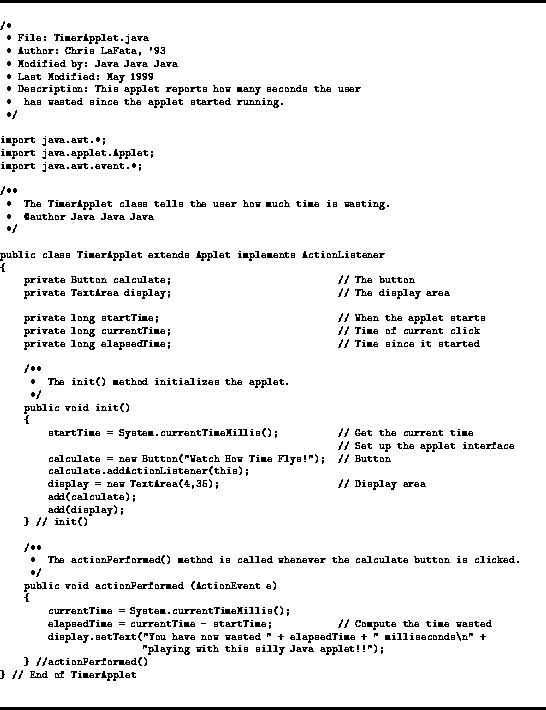
TimerApplet's complete source code is shown in Fig 2. The program begins with a comment block which presents important information about the program, including the name of the file that contains it, the name of the author, and a brief description of what the program does.
In addition to the comment block at the beginning of TimerApplet, there is also a comment block in front of the actionPerformed() method (Fig 2). There are also several single-line comments used to clarify the code. Commenting your code in this way is an important part of program development. Appendix A lays out the style and documentation guidelines that are followed in this book. In subsequent laboratory projects, as our programs become more sophisticated, we will introduce additional documentation requirements.
Students invariably hate putting comments in their programs. After all, it seems somewhat anticlimactic, having to go back and document your program after you have finished designing, writing, and testing it. The way to avoid the sense of anticlimax is to ``document as you go'' rather than leaving it to the end. In many cases, your design document can serve as the basis for the comments in your program. One of the main reasons for commenting code is so that you, or someone else, will be able to understand the code the next time you have to modify it. Students who go on to be professional programmers often write back with reports that they now understand how important program documentation is. As one of my former students told me,
  All hard-headed coders say ``Phooey,
  Putting comments in code is just hooey!''
  But when they are asked,
  To reread what they hacked,
  They discover their programs are screwy.
The next portion of the program contains the three import statements:
    import java.applet.Applet;
    import java.awt.*;
    import java.awt.event.*;
The import statement is a convenience that allows you to refer to library classes by their short names rather than by their fully qualified names. For example, the first import statement tells the compiler that in this program we will refer to the java.applet.Applet class simply as Applet. This allows us to write a statement like
public class TimerApplet extends Applet
instead of being required to use the full name for the Applet class
public class TimerApplet extends java.applet.Applet
The expression java.awt.* uses the asterisk (``*'') as a wildcard character that matches any public class name in the java.awt package. This allows you to refer to all public classes in the java.awt package -- for example, java.awt.Button and java.awt.TextArea -- by their short names. The third statement matches all the class names in the java.awt.event package, which allows the program to refer to java.awt.event.ActionListener by its short name.
The next element in the program is the header of the class definition:
public class TimerApplet extends Applet implements ActionListener
which serves the purpose of naming the class TimerApplet, designating its accessibility public, specifying that it is an Applet, and declaring that it implements ActionListener, an interface for handling (or listening for) events such as mouse clicks. The header begins the definition of the class, which extends all the way to the last line of the program -- the line marked with the //End of TimerApplet comment. A block is a sequence of statements enclosed within braces. The body of a class definition is a block, as is the body of a method. Note how the statements in the block are indented, and how the braces are aligned and commented. These style conventions serve to make the program more readable.
Following the header are several variable declarations:
    private Button calculate;                      // The button
    private TextArea display;                      // The display area

    private long startTime;                        // When the applet starts
    private long currentTime;                      // Time of current click
    private long elapsedTime;                      // Time since it started
The first two declarations declare the names of a Button object and a TextArea object. Both of these objects are visible in the applet's window (Fig 1). The next line of declarations declares three integer variables that are used by the applet to store various times. As we will see in more detail in the next chapter, variables are memory locations that can store values. For now, just note that the names of these variables, startTime, currentTime, and elapsedTime, have been chosen to be descriptive of their purpose in the program.
The first variable will be used to store the time at which the applet started. The second variable will be used to store the current time, and the third variable will be used to store their difference, which is the elapsed time.
The next element of the program is the init() method:
    public void init()
    {
        startTime = System.currentTimeMillis();          // Get the current time
                                                         // Set up the applet interface
        calculate = new Button("Watch How Time Flys!");  // Button
        calculate.addActionListener(this);
        display = new TextArea(4,35);                    // Display area
        add(calculate);
        add(display);
    } // init()
The init() method is called once, automatically, whenever an applet is loaded into the Java Virtual Machine. Its purpose is to initialize the applet's interface and any variables used in the applet's processing. As the method's comments indicate, the method gets the current time from the System object and stores it in the startTime variable. It then creates (new) a Button and a TextArea and adds them to the applet, which causes them to appear on the screen when the applet is run.
The actionPerformed method is the last element in the program:
    public void actionPerformed (ActionEvent e)
    {
        currentTime = System.currentTimeMillis();
        elapsedTime = currentTime - startTime;           // Compute the time wasted
        display.setText("You have now wasted " + elapsedTime + " milliseconds\n" +
                        "playing with this silly Java applet!!");
    } //actionPerformed()
This method is called automatically whenever the applet's button is clicked. Its purpose is to ``perform action'' when a button-click event takes place. In this case the action it takes is to get the current time again from the System object. This time it stores it in the currentTime variable. It then computes elapsedTime as the difference between currentTime and startTime. It displays the result in the applet's TextArea, which is named display. Notice that something that looks like an arithmetic expression is used to incorporate the current value of elapsedTime into the ``You have now wasted'' message.
Using whatever programming environment you have available in your computing lab, edit, compile, and run the TimerApplet program. However, don't just keyboard the whole program and then compile it. Instead, use the stepwise refinement approach as outlined here.
    public class TimerApplet extends Applet implements ActionListener
    {
        public void actionPerformed (ActionEvent e)
        {
        } //actionPerformed
    } // End of TimerApplet
This is an example of a stub class. A stub class has the basic outline for a class but no real content. In this case the definition must contain a stub definition of the actionPerformed() method, which is part of the ActionListener interface. After entering this, compile and run the program. It should compile correctly, but it won't do anything because it doesn't contain any executable code.
    public class TimerApplet extends Applet implements ActionListener
    {
        private Button calculate;                            // The button
        private TextArea display;                            // The display area

        private long startTime;                              // When the applet starts
        private long currentTime;                            // Time of current click
        private long elapsedTime;                            // Time since it started

        public void init()
        {
        } // init()

        public void actionPerformed (ActionEvent e)
        {
        } //actionPerformed
    } // End of TimerApplet
Recompile the program and run it again. It should compile correctly, but it still won't really do anything. But you've accomplished a lot, because you've now correctly coded the basic structure of the program.
Hopefully, going through this exercise has illustrated some of the advantages of the stepwise refinement approach to writing Java code.
In this exercise you will make modifications to TimerApplet which will introduce syntax errors into your program. The main purpose here is to give you a first look at how your programming environment reports error messages. You'll also learn some of the most fundamental rules of Java syntax.
For each of the items below, make the editing change and then recompile the program. Make note of any error messages that are generated by the compiler. Try to understand what the message is telling you, and try to learn from the error, so it will be less likely to occur next time. After you have finished with that error, restore the code to its original form and move on to the next item.
Recall that semantic errors cannot be detected by the compiler. They are errors in the logic of the program which cause it to do something it is not really supposed to do. For each of the following errors, try to think about what will happen before you run the program. Then try to describe the logic error that is being committed. Ask yourself what kind of test you might perform to detect the error (if your didn't already know where it was).
That's enough! Feel free to make up your own experiments and play around some more with the program.