R. Morelli
The purpose of this lab is to provide practice using loop control structures in designing and implementing solutions to programming problems. The objectives are
Suppose that Atlas Computer Security has contacted you about consulting for them to develop public key encryption software. One thing you're going to need in this software is a method that can test whether a number is a prime or not. To help demonstrate your prime number tester, the company wants you to write a Java applet that prompts the user for a positive integer and then displays all of the prime numbers less than or equal to the user's integer. If they like your demo, they will probably give you the contract for the encryption software.
The Graphical User Interface (GUI) for this applet needs a component to handle the user's input, and another component to display the prime numbers. A TextField would be an appropriate input component, because the user needs to input a single integer value. The TextField can also serve as the means by which the user indicates that an action should be taken. Whenever the user types a Return or Enter in the TextField, the program should test the TextField's current value for primality.
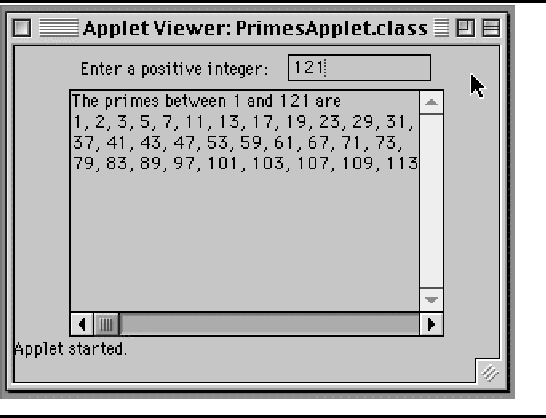
The output component should allow the program's output to extend over several lines. This is a perfect job for a TextArea. In addition to these components, we'll need a Label to prompt the user as to what kind of input is expected. Figure 1 provides a summary of the GUI.
There are two tasks involved in the demo program. One is to provide a user interface, a GUI. The other is to provide the expertise needed to determine whether a number is prime. This suggests that we should break this problem up into two objects: a PrimesApplet object, which will manage the interface, and a Primes object, which will contain methods to determine whether a number is prime and to find prime numbers within a certain range.
The design of PrimesApplet should be similar to that of other applets we've built. Of course, the applet must create an instance of the Primes. This is the object it will call upon to test whether numbers are prime.
In terms of its GUI elements, the applet should contain a TextField for user input and a Label for prompting the user. These components should be instantiated in the applet and added to the applet in the init() method. Because it will generate user actions, whenever the user types the Enter key, the TextField should be given an ActionListener. This should also be done in the init() method.
The algorithm used by PrimesApplet is event driven. In the init() method, the applet should be registered as the listener for ActionEvents that occur in the TextField. Then, whenever such an event occurs, Java will call the applet's actionPerformed() method, where the event should be handled. The actionPerformed() method should get the input from the TextField, convert it to an integer, and then display all of the prime numbers less than the user's number:
    1. Get the user's input from the TextField.
    2. Convert the input String into an int.
    3. Display in the TextArea all the prime numbers less than
       the user's number.
Step 2 of this algorithm will require us to use the Integer.parseInt() method to convert a String into an int:
int num = Integer.parseInt("564"); // Converts "564" to 564
Step 3 of this algorithm will require a loop, and it is here where the applet must call on the expertise of the Primes object. Because this step will be somewhat complex, it should be encapsulated into a separate method.
Taken together, these design decisions lead to the following specification for the PrimesApplet class:
Note that the findPrimes() method will be a private method. This is appropriate, since it is not intended to be used outside of this class.
As our design of the PrimesApplet class suggested, the Primes should have a public method that can be used to test whether a number is prime. Let's call this method isPrime(). This should be a boolean method that should return true when its int parameter is a prime number. Otherwise it should return false.
The Primes class does not have any kind of internal state that would be represented in the form of instance variables. Any variables that it may need to determine if a number is prime can be declared within the isPrime() method. Thus, its specification is very simple:
The findPrimes() method takes a single int parameter, N, and will display all of the prime numbers, less than or equal to N, in the applet's TextArea. Its algorithm should use a loop to test the numbers between 1 and N and display all the prime numbers in that range. Obviously, this is a counting loop, because you know exactly how many iterations it must make before entering the loop. Also, the task of determining whether an integer is prime or not will be farmed out to the Primes object. Thus, this gives us the following algorithm:
    Display "The following are the primes between 1 and N" in TextArea
    for each integer, k, the range 1 to N
        if k is prime
            display k in the TextArea
The isPrime() method should employ a loop to find whether its
parameter, N, is a prime. The algorithm in this case should make
use of the definition of a prime number -- that is, a number
divisible only by itself and 1. It could try dividing N by
K, where K is  and so on up to N-1. If any of
these numbers is a divisor of N, then N is not a prime
number. If none is a divisor of N, then N is a prime
number. Because the number of iterations required for this loop is
not known beforehand, it will require a noncounting loop structure.
and so on up to N-1. If any of
these numbers is a divisor of N, then N is not a prime
number. If none is a divisor of N, then N is a prime
number. Because the number of iterations required for this loop is
not known beforehand, it will require a noncounting loop structure.
To test whether N is prime it is necessary to have an entry condition that is the conjunction of two conditions. The loop should iterate while K is less than N, and while none of the preceding values of K were divisors of N. In other words, the loop should terminate when a value K is found that evenly divides N. One way to handle this task is to use a local boolean variable as a flag that will be raised when a value K is found that divides N:
    Initialize notDivisibleYet to true
    Initialize K to 2
    while (notDivisibleYet AND K < N)  {
        if N is divisible by K
            set notDivisibleYet to false
        increment K;
    }
This is an example of a complex loop bound . It involves the conjunction of both a count bound and a flag bound and it will terminate when either bound is reached. Thus the loop terminates when either K equals N or when N is divisible by some value of K < N.
Note that for the conjunction notDivisibleYet AND K < N to be
true, both halves of it must be true. However, for it to be false,
either half may be false; it is not necessary that both halves be
false. In this case either notDivisibleYet will be false
or  will be false. This is an instance of the logic
rule known as DeMorgan's Law , which can be
stated as follows:
will be false. This is an instance of the logic
rule known as DeMorgan's Law , which can be
stated as follows:
((P && Q) == !(P || Q))
where P and Q are simple boolean conditions.
To summarize, the above loop structure can be used in isPrime(N) to test whether N is prime. In order to decide whether N is a prime, isPrime() must check which bound actually terminated the loop, and then return the proper boolean result. If the loop terminated with K equal to N, it follows that N is prime, and isPrime() should return true. Otherwise N is not prime and it should return false.
The implementation of this program is left to you as a lab (or programming) exercise, but here are some hints and suggestions:
You will need to create a PrimesApplet.html file which accesses the PrimesApplet.class in an applet tag to run the PrimesApplet applet. Once you have successfully written and tested a simple interface, define the Primes class and write and test the isPrime() method. In order to write this method, you will have to complete the development of the algorithm described in the previous section. Use pseudocode to help you lay out the algorithm. You can use your interface to help you test the method. Have the user input an integer, and then just test whether that integer is prime.
Once you have a correct isPrime() method, write and test the findPrimes() methods. This last step should be very simple.
    TextArea display;              // Declare a variable
    .
    .
    display = new TextArea();      // Create an instance (init() )
    .
    .
    display.appendText ("blah") ;  // Use it (actionPerformed() )
If you forget to instantiate in init() the use of display in actionPerformed() will cause a null pointer exception.
As we described, public key encryption involves the use of composite numbers as well as prime numbers. A challenging extension to this lab would be to let the user type in a composite number and display its prime factorization. Design a method that takes an integer parameter and displays its prime factors in the TextArea. For example, if the user inputs 40, your method should display 40 = 2*2*2*5.