R. Morelli
The purpose of this lab is to use some of the methods of the String class and to employ basic looping structures in solving a programming problem.
Write a Java applet that translates an English sentence or expression into Pig Latin . The rules of Pig Latin are
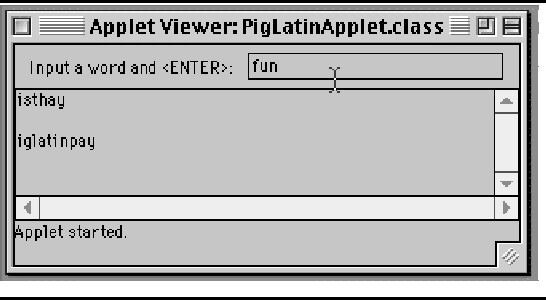
The Graphical User Interface (GUI) for this applet should contain an input TextField and an output TextArea. The user should be prompted to type a phrase into the TextField and the applet should convert the phrase to PigLatin and display the result in the TextArea. See Figure 1.
One way to decompose this problem is to divide it into two classes: PigLatinApplet, which implements the user interface, and PigLatin, which contains the expertise needed to translate English into Pig Latin. PigLatinApplet should get the input from the user (in a TextField), pass it to PigLatin, which will translate it into Pig Latin, and then display the result in the TextArea.
The algorithm for this lab will solve the following problem: Given an English sentence or expression -- a string of words separated by blanks -- translate the string word by word into Pig Latin. For the sake of simplicity, let's leave off all punctuation symbols. The algorithm should go through the string word by word, and for each word, it should translate it into Pig Latin and concatenate it to the result string. As we know, in order to translate a word into Pig Latin, we must find the location of its first vowel and then follow the above translation rules. This suggests the following algorithm, which could be encapsulated into the translate() method:
    Initialize a result string
    For each word in the input string      // String tokenizer task
        translate it into Pig Latin        // translateWord task
        Append it to the result string     // String concatenation task
    Return the result string
As the comments suggest, this algorithm can be broken up into subtasks. The first subtask is to get each word out of the input string. This is a perfect job for the StringTokenizer class discussed above. The second subtask is to translate a single word into Pig Latin. This task is substantial enough to be encapsulated into a separate method, the translateWord() method. Lastly, string concatenization is easily done by using the ``+'' operator.
The translateWord() Method. To translate a word into Pig Latin, you must find the location of its first vowel ('a', 'e', 'i', 'o', or 'u') and then apply the above rules. If the word begins with a vowel (or doesn't contain a vowel) you simply append ``yay'' to the end of the word -- ``able'' becomes ``ableyay'' and ``my'' becomes ``myyay.'' Otherwise you divide the word into substrings with the first vowel becoming the first letter of the Pig Latin word and any letters preceding it being appended to the end of the word and followed by ``ay'' -- ``string'' becomes ``ing'' + ``str'' + ``ay'' or ``ingstray.''
The findFirstVowel() Method. The task of finding the first vowel in a string is also a good candidate for encapsulation into a separate method. It takes an English word as its String parameter and returns an int giving the index location of the first vowel.
If the word does not contain a vowel -- for example, ``my'' -- the method should return 0. For example, findFirstVowel("hello") should return 1 as the location of 'e', and findFirstVowel("able") should return 0, and findFirstVowel("my") should also return 0. The reason for having it return 0 in two different cases is that in both cases you handle the translation in the same way -- ``able'' becomes ``ableyay'' and ``my'' becomes ``myyay.'' In other words, according to the Pig Latin rules, there's no difference between a word that begins with a vowel and one that doesn't contain a vowel.
The above analysis leads to the following specification for the PigLatin class. Its main role is to translate English expressions into Pig Latin. One design we could use here is to model PigLatin after the Math class -- that is, as a utility class which provides a useful method, but which is not designed to be instantiated at all.
As this design suggests, the PigLatin class will have only one public method but will utilize the private methods described above to help perform its task.
The design of PigLatinApplet should be similar to that of other applets we've built. It should contain a TextField for user input and a Label for prompting the user. Note that its interface (Figure 1) does not contain a Button, so the applet's action events will be generated when the user types the Enter key in the TextField. (See the In the Laboratory section in Chapter 5.)
PigLatinApplet should implement the ActionListener.actionPerformed() method to handle TextField actions. When the user types Enter, actionPerformed() should get the input from the TextField and pass to PigLatin.translate(), which will return a (Pig Latin) string. The applet should then append the result to the TextArea.
Recall that since we have patterned PigLatin after the Math class (and Integer class), there is no need to instantiate it in order to use its static methods. So to translate ``Hello World'' into Pig Latin we could simply write
System.out.println(PigLatin.translate("Hello World"));
The translate() method is a class method -- a static method that is associated with the class itself.
The implementation of this program is left to you as a lab (or programming) exercise. Remember to use stepwise refinement as you develop your program. Also, develop and use appropriate preconditions and postconditions for each of the methods in your program. These will be helpful during design, coding, and testing of your algorithms. For example, the findFirstVowel() method would have the following conditions:
    // findFirstVowel(String s)
    // PRE:  s != NULL
    // POST: findFirstVowel(s) == 0 IF CONTAINS NO VOWELS
    //       findFirstVowel(s) == n IF s.charAt(n) IS FIRST VOWEL
Because it's redundant in Pig Latin to have words like ``myyay'' that contain ``yy,'' revise your program so that it converts ``my'' and ``why'' into ``myay'' and ``whyay'' instead of ``myyay'' and ``whyyay.'' To do this, you could treat English words that end in ``y'' as a special case in your translate() method. Think about what sort of Java expression you would use to determine if a word's last letter is 'y'? What String method(s) will you need to form this expression?