 |
R. Morelli
The purpose of this lab is use Java GUI components and layouts to design and implement an interface for a bank Automatic Teller Machine (ATM). The interface, and eventually the completed application, should be designed so that it may be implemented either as an applet or an application. The objectives are
Design and implement a Java class that simulates an ATM interface. Your solution should implement the class, AtmMachine, as an ATM interface, as shown in Figure 1. It is not necessary to build complete ATM machine functionality into the applet beyond that which is demonstrated in the demo below -- just implement the interface. If you wish, you may design your own layout for the interface, as long as it has the components required in the specification.
The Graphical User Interface (GUI) should contain a keyPad -- a 4 x 3 array of buttons arranged as shown in the demo and a commandPad, a collection of buttons for the various functions that one finds on an ATM machine. It should contain a JTextArea which displays the result of clicking one of the buttons. Feel free to design your own layout of these components!
|
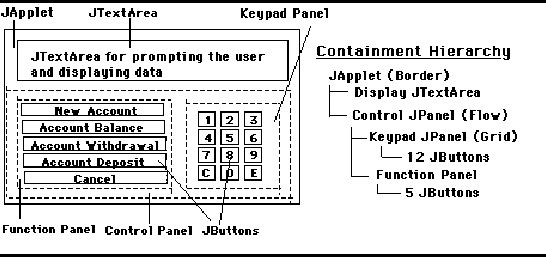
The demo applet consists of a JTextArea that is used as the ATM's display screen. It displays all I/O during an ATM session. The only other interface components are the 12 keypad and 5 function JButtons. The demo uses several JPanels to achieve its overall layout (Figure 2). First there is a main panel that contains all of the interface components. It uses a BorderLayout with the machine's display in the center and the keypad and function pad at the south edge. The function pad and keypad are organized into separate panels and arranged as GridLayouts. Finally, a fourth panel is used to group the two collections of buttons so that they may be added to the south area of the main panel.
|
One goal of this lab is to develop an ATM interface that can be used as either an applet or a stand-alone application. This suggests that the interface itself should be defined as a separate class that gets instantiated either in an application or an applet. Let's call this the AtmMachine class.
The AtmMachine class can use a JPanel as the main container for its components. However, a JPanel cannot stand by itself. It must be added to either a JFrame or a JApplet. If AtmMachine is to be used with an applet, it can simply add its main panel to the applet itself. However, if it is to be used with an application, it will need to add its main panel to the application's JFrame. This suggest that AtmMachine will need two constructors, one to be used with an application and one with an applet:
    public AtmMachine(JFrame f) {  // constructor for an application
        atmPanel = createInterface();
        f.getContentPane().add(atmPanel);
        f.pack();
        f.show();
    }

    public AtmMachine(JApplet app)  { // constructor for an applet
        atmPanel = createInterface();
        app.getContentPane().add(atmPanel);
    }
Note that each constructor leaves the main task of creating the interface to the createInterface() method, which has the following signature:
private JPanel createInterface();
It takes no parameters but returns a reference to a JPanel, which is assigned in the constructor to the main atmPanel. The applet constructor adds atmPanel to the applet, which is passed as its parameter. The application constructor adds atmPanel to the application's JFrame, which is passed as its parameter. In this way we achieve a flexible AtmMachine class that can be used as the basis for either an applet or an application.
To use AtmMachine as an applet, we need only create an AtmMachine in the init() method. Thus the entire applet definition is
    import javax.swing.*;
    import java.awt.*;
    import java.applet.Applet;

    public class AtmTest extends JApplet {
        AtmMachine atm;                      // Declare AtmMachine

        public void init() {
            setSize(500,300);
            atm = new AtmMachine(this);	 // Create a new atm
        } // atmTest applet
    } // AtmTest
Invoking AtmMachine's constructor in init() will effectively pass control to the new AtmMachine. Note that the applet does not handle any actions directly. All actions are handled by its atm object.
To create an application that uses AtmMachine is equally simple:
    import java.awt.*;
    import javax.swing.*;

    public class AtmApplication {
        public static void main(String args[]) {
            JFrame f = new JFrame();
            f.setSize(600,500);
            AtmMachine atm = new AtmMachine( f );
        }
    }
In this case we create a AtmApplication (a subclass of JFrame) for the AtmMachine in main() and pass a reference to it to the AtmMachine constructor. This effectively passes control to atm, which will handle all of the application's action events.
The design of AtmMachine is straightforward. It will require the following GUI components: 12 keypad JButtons, 5 function pad JButtons, and one JTextArea to serve as the main display area. These should be declared as instance variables and instantiated in the createInterface() method or in one of its submethods. Of course, if AtmMachine() is going to handle the ActionEvents generated by its various buttons, it must implement the ActionListener interface.
The keypad buttons are too numerous to implement as 12 distinct instance variables, so an array should be used to store each JButton as in the MetricConverter example in this chapter. It may be useful to define a separate method to handle the subtask of creating the keypad panel. Like the createInterface() method, it should return a JPanel, which contains all of the keypad buttons. The result of the method could then be assigned to the AtmMachine's fnPanel:
fnPanel = createKeypadPanel(); // Create the whole functionpad
Like the calculator example, the keypad should utilize a GridLayout. Of course, each JButton should invoke the addActionListener() method to register the AtmMachine as its ActionListener. Any object that implements the ActionListener interface can serve as an ActionListener.
The function buttons may also be implemented as an array. Like createKeypadPanel(), this subtask might also be defined as a separate method which returns a JPanel.
The actionPerformed() method should handle the various ActionEvents that will be generated. It should use an if-else structure, similar to the algorithm we used in the SimpleTextEditor example. The method should begin by getting the source of the event. Because getSource() returns an Object, its result must be cast into a JButton. It will also be useful to get the button's label, since this can be used to determine which Button generated the event:
    public void actionPerformed(ActionEvent e) {
        Button b = (Button)e.getsource(); // Get the button that was pressed
        String label = b.getText();      //  and its label
        if (b == newAcc)
            newAccount();	          // New account
        else if (b == accBal)
            accountBalance();             // Check balance
        else if (b == accDP)
            accountDeposit();             // Make deposit
        else if (b == accWD)
            accountWithdrawal();          // Withdrawal
        else if (b == cancel)
            cancel();                     // Cancel transaction
        else
            processKeyPad(label);         // Process the 12 key pad
    } //  actionPerformed()
The control structure used in this method is an if-else multiway selection structure.
Note that each of the function keys is associated with its own method. This is a flexible design that will allow us to ``grow'' the application. As more functionality is added, changes can be made directly to these methods without altering the overall structure of the program. This is a good use of stepwise refinement in our design.
Finally, note that all of the keypad functions are handled by a single method processKeyPad(), which takes the Button's label as its parameter. This also will enable us to ``grow'' the application's functionality without changing its overall structure.
Although AtmMachine will not be fully implemented, it can only be properly tested if it has some degree of functionality. Therefore let's design an algorithm that will at least demonstrate that it has the proper structure for a full-fledged implementation.
As you know, the first thing you do when using an ATM is enter your personal ID number (PIN). If you enter it correctly, you are then allowed to enter one or more transactions. If not, you are given an error message and allowed to reenter it. Once your PIN has been validated, you are allowed to perform one or more transactions -- withdrawal, deposit, and so forth. When you are finished, you press the ``Cancel'' key to end the session.
For this partial implementation, the various transactions can be implemented by simply printing a message on the ATM's display. For example, a withdrawal could be handled as
  if (state == GO_STATE)
    display.appendText("How much do you want to withdraw?\n");
Note that this transaction depends on the machine being in the GO_STATE. If the machine is not in the proper state, clicks on the withdrawal button should just be ignored.
Our partial implementation should be able to distinguish the various phases of the user's interaction with the AtmMachine. One way to implement this is by using a state variable whose values represent the phases of an ATM transaction. One design might be the following:
    private static final int INIT_STATE = 0;  // State constants
    private static final int PIN_STATE = 1;
    private static final int GO_STATE = 2;

    private int state = 0;        // State of the atm machine
In this design the machine can be in one of three states: an INIT_STATE, which lasts until the user clicks on the Start Button; a PIN_STATE, which lasts until the user enters a correct PIN; and a GO_STATE, which lasts until the user cancels the session.
Obviously, the methods that carry out the various transactions must check and update the state depending on the user's input. For example, the cancel Button on the function pad could be used both to start and cancel a transaction, depending on the ATM's state:
    private void cancel() {
        if (state == INIT_STATE) {
            cancel.setText("Cancel");
            display.appendText("Please enter your PIN and click on ENTER.\n");
            state = PIN_STATE;
        } else if (state == GO_STATE || state == PIN_STATE)
            state = INIT_STATE;
        cancel.setText("Start");
    } // cancel()
Initially the cancel Button is labeled ``Start.'' If the ATM is in the initial state when it is clicked, then its label is changed to ``Cancel'' and the user is prompted to enter a PIN. In all other states, cancel will be labeled ``Cancel.'' In those cases, if it is clicked, the user wishes to cancel an operation or quit the session, so the method should set the machine back to its initial state.
The most difficult state transition occurs between the PIN_STATE and the GO_STATE, because it is here that the user's PIN must be checked for validity. What complicates this task is that the keypad must be used to enter the PIN. Therefore the processKeyPad() method must check the machine's state in order to know how to process the number keys. There are three possible states, whose actions can be identified by the following table:
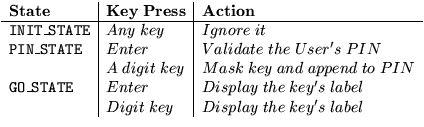
Thus when the machine is in its initial state, all key presses on the keypad are ignored. If the user is in the process of entering a PIN (PIN_STATE), then if the Enter key is pressed, this signals that the user has finished entering the PIN, which should then be validated. If it is valid, the machine should switch into the GO_STATE. Otherwise an error message should be displayed. If a digit key is pressed while the user is entering a PIN, then that digit should be appended to the PIN and displayed as a (*) -- that is, masked -- in the display. (See Figure 1 for an example.) Finally, when the machine is in GO_STATE, all key presses on the keypad should simply be echoed in the display. Of course, in a full-fledged implementation these key presses would have to be handled in an appropriate, context-sensitive manner. This would require that we expand the number of states to include things like WITHDRAWAL_STATE, and so on.
To process the user's PIN, the AtmMachine should maintain an instance variable of type String, which is initially set to the empty string. As the user enters a PIN, the individual digits can be appended to the String, which can be validated by a separate method when the user types the Enter key. For testing purposes, it will suffice to develop a simple validity test -- for example, the PIN must contain a value between 1111 and 9999.