 |
R. Morelli
Design and implement a stock market quote service by extending the client/server model developed in the generic client/server. The stock market quotes will be stored in a tab delimited text file that is accessible to the server -- for example, in the directory of the server itself. The service works as follows: The client prompts the user for the stock's symbol. It then sends the symbol, as a query, to the quote server. The quote server looks up the stock in the file and returns, as a single line, the stock symbol, name, and current price. If the server can't find the stock, it should return a line which reports ``ERROR: Stock not found.'' The client should report this error as ``Sorry, the stock you requested cannot be found. Please make sure your symbol is correct and try again.''
The quote file stores the stock data as tab delimited text, with one
stock per line. That is, there is a tab character, \t, between each
field in the line:
    AppleC     Apple Computer   45.0
    Cisco      Cisco Systems    103.58
    Intel      Intel            129.25
    MCSFT      Microsoft        150.50
    Netscpe    Netscape	        63.87
    SunMic     Sun Microsystems 89.75
Running a solution to this lab depends on being able to deploy the server classes on a server computer. Your instructor will give you instructions on how this can be done for your lab.
java StockServer portNumber
where portNumber gives the port number at which the service will be
run. It's good to use high numbers, such as 10001.
For the keyboard interface, you start the client by typing:
java StockClient serverURL serverPort
where the command line arguments give the server's URL and port number.
Once the StockClient starts running, it will prompt the user to input
a stock symbol and will query the server and report the result.
For the GUI interface, you start the client by typing:
java StockClientGUI serverURL serverPort
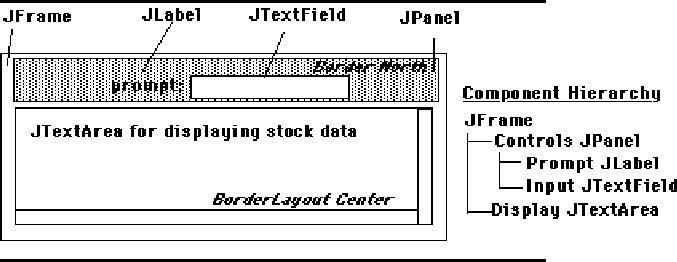
This will open a top-level frame containing a TextField and an
TextArea. Each time a stock symbol is typed into the text field the
client will query the server and report the result.
|
It is important that the user interface for this application be kept distinct from the client itself. That will make it possible for the client part of the service to be attached to other interfaces -- for example, a GUI.
Our goal is to develop a client/server application to provide stock quotes. Given that we want the interface to be kept separate from the client, this suggests that we need three separate classes:
The StockServer class should be derived from the generic Server class. You should use the EchoServer as a model. What's new in StockServer is that it has to be able to read stock data from a file in order to supply answers to the queries it will receive. One strategy that the server could use is to read the entire file of quotes into some sort of memory structure when it starts up and then just look them up from there as needed. However, because it's important that the stock quotes be up to date, it's probably a better idea to search the quote file itself each time a query is received.
One method that the StockServer must implement is the provideService() method. Once a proper connection is established with the client, this method should carry out something like the following algorithm:
What methods does the StockServer need, in addition to provideService()? Steps 1 and 3 of the above algorithm should be simple method calls. However, step 2 will require several statements, and possibly even additional methods. Therefore, let's design a method, named getQuoteBySymbol(), to handle this task.
According to our specification, the server should receive a symbol string from the client and return a string to the client. This suggests that the getQuoteBySymbol() method should take a String parameter, the stock symbol, and return a String result, the complete stock quote, as described in the specification. Because this method will be used only within this class, it should be declared private.
In terms of an algorithm for this method, have we already solved the problem of reading data from a text file? Yes. The following algorithm from Chapter 14 can easily be adapted to read the stock file:
    BufferedReader inStream =                  // Create an input stream
        new BufferedReader (new FileReader(fileName));  // And open the file
    String line = inStream.readLine();         // Read one line
    while (line != null) {                     // As long as there are more lines
        display.append(line + "\n");           //  Display the current line
        line = inStream.readLine();            //  Read the next line
    }
    inStream.close();                          // close the input stream
What sort of adaptations will we need to make? One change is that it may not be necessary to read every line of the file. If we find the stock we're searching for before the end of the file, we can just execute a return statement, thereby exiting the while loop before the end of file. Some of the other design questions you should think about in designing this method are
The StockClient class should be derived from Client. Therefore, it must implement the requestService() method. What's new in this class is that we want to separate its communication functions from its interface functions. Recall that EchoClient used a method named readFromKeyBoard() to get the user's query. We want StockClient to get its input -- a stock symbol -- from the interface. Another difference is that StockClient should respond to user's initiatives, rather than simply run through a loop that prompts the user on each iteration. How can these changes be done?
Another design issue for StockClient concerns how long it should keep open the connection. The user will initiate queries, so it would not be good design to keep the connection open if the user hasn't even requested a stock quote. To do so would prevent other clients from accessing the server. A better strategy would be to create a new StockClient each time the user initiates a query, have the client make one query, and then say goodbye.
It looks as if we don't want our StockClient to run() in a loop at all. To prevent this we just won't call its start() method. Instead, we want to be able to call a method (from the interface class) that causes the StockClient to send a query to the StockServer. Thus, we need a public method that takes a String parameter, a stock symbol, and returns a String, the stock quote. An appropriate algorithm for the getQuote() method would be
    public String getQuote( String symbol ) {
        String replyStr = "";
       // write the symbol to the socket
       // read the server's reply
       // say "goodbye" to the server
       return replyStr;
    }
Given this design for getQuote(), each time the user initiates a query through the interface, the interface class would execute something like the following code:
    StockClient sc = new StockClient( host, port );
    String result = sc.getQuote( symbol );
What about the requestService() method? How would our design make use of it? It looks as if we don't even need to use this method, so we can just implement it as a stub method -- that is, we can leave its body empty. In other words, this subclass of client will not use the run() or the requestService() methods.
In designing a client/server application, you must take care that both the server and the client know each other's protocol. For example, after the connection is made, will the server say ``hello'' rather than just waiting for a query from the client? If so, then the client must read the ``hello'' before sending a query. Similarly, how will the client indicate that it is done? The server must be aware of how the client says ``goodbye'' so that it can close the connection. The important point is that both the client and server must agree upon the protocol they will use for communication. Otherwise communication will inevitably break down.
Develop a simple frame-based interface to test your client. This class should implement the GUI described earlier.
Testing a client/server application presents a real challenge because there are so many different kinds of things that can go wrong. That's why it is especially important to develop your application in stages using stepwise refinement. Here's a stepwise development plan that you might wish to follow:
One advantage of using a tab-delimited text file, instead of a binary file, is that you can easily type in some test data.