|
CPSC 110-08: Computing on Mobile Phones
|
This lecture is a follow-up to the How to Flip a Coin lecture. In that lecture we learned how to use App Inventor's Pseudo Random Number Generator (PRNG) to simulate a coin flip. In this lecture we will develop an algorithm that requires a while loop to generate a sequence of coin flips and we will count the numbers of heads and tails.
Recall that the sequence of numbers generated by App Inventor's PRNG is not a truly random sequence. As we discussed, the PRNG sequence is generated by a deterministic function that computes the n+1st value in the sequence from the nth value:
Xn+1 = (aXn + b) mod m
Thus, a PRNG is model of a truly random process. For any such model, it is natural to ask: ow good is App Inventor's PRNG? How well does it model a truly random process?
How can we test the quality of App Inventor's PRNG?
One way would be to see how well it does at simulating a random process such as flipping a coin. We all know that if you flip a coin it will come up either heads or tails. But suppose you flip a real coin 10,000 times and it came up heads 4,000 times and tails 6,000 times. You might wonder whether that was a fair coin or not.
Well, perhaps 10,000 flips is not enough? So suppose you repeated that experiment 5 times and got the following results:
| Trial | nTosses | nHeads | nTails |
|---|---|---|---|
| 1 | 10,000 | 4000 | 6000 |
| 2 | 10,000 | 3985 | 6015 |
| 3 | 10,000 | 3995 | 6005 |
| 4 | 10,000 | 3700 | 6300 |
| 5 | 10,000 | 4010 | 5990 |
If you received these results, you woudl doubt whether the coin is
truly fair? Maybe it is rigged somehow? Similarly, if you are using
App Inventor's PRNG to model a coin toss, then over the long run it
should produce roughly 50% heads and 50% tails. How can we test
whether it is a good model of randomness?
Let's write an app to help us perform this experimental test of App
Inventor's PRNG.
Our app must let the user input how many times they want to 'flip'
the coin and must report how many heads and tails were obtained. To
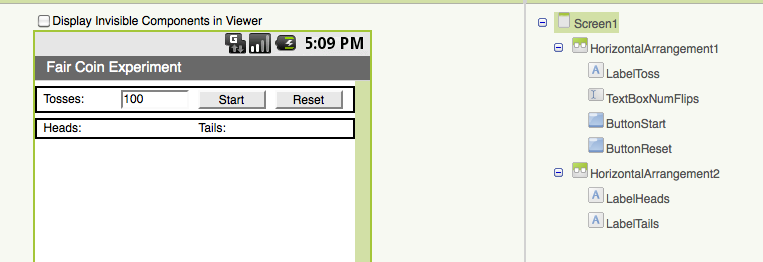
do this, our user interface will contain the following components:
The Fair Coin Experiment App
User Interface
| Component | Purpose |
|---|---|
| TextBoxNumFlips | Let's the user input the number of times to 'flip' the coin |
| LabelToss | Labels the TextBox |
| LabelHeads | Reports the number of heads obtained |
| LabelTails | Reports the number of tails obtained |
| ButtonStart | Flips the coin repeatedly until desired number of flips is obtained |
| ButtonReset | Resets all counters so the experiment can be repeated. |
What variables do we need for this app? That depends on what objects we want to model and what data we want to remember. In this app we are modeling a two-sided coin, so we should have a Coin variable. And we need to count how many times it comes up heads and tails. So we need a couple of counter variables. And we need a variable to remember how many times the user wants us to 'flip' the coin. Also, because we will need loop to repeatedly flip the coin. we will need a variable to keep track of the number of times we have repeated the loop.
This leads to the following design:
| Variable | Purpose |
|---|---|
| Coin | Model: Represents a 2-sided coin where 1 represents heads and 2 represents tails |
| nFlips | Loop limit: Represents how many times the user wants to flip the coin. |
| nHeads | Counter: Counts the number of heads obtained |
| nTails | Counter: Counts the number of tails obtained |
| flip | Loop counter: counts how many times we have 'flipped' the coin |

To make it easier to implement our experiment we should divide it up into procedures that represent the basic steps. This will allow us to think about the experiment at a higher level of abstraction.
We'll need a procedure to initialize the experiment -- i.e., set it up. Another procedure to perform a coin flip and keep track of whether it is heads or tails. And another procedure to report the results. This leads to the following design:
| Procedure | Purpose |
|---|---|
| InitializeTheExperiment | Initialize all the variables and data we use to keep track of the results. |
| ReportTheResults | Display the number of heads and tails in the user interface. |
| DoOneCoinFlip | Simulate the coin flip and count whether it was a head or a tail. |
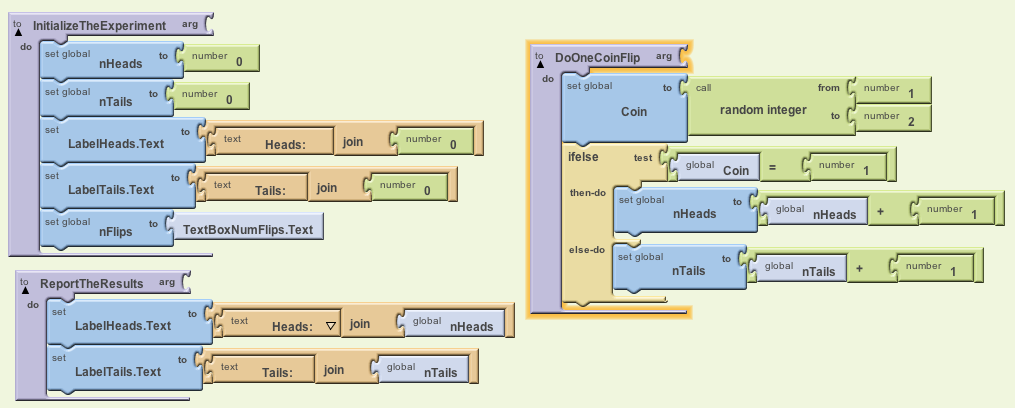
Let's now develop the algorithms for each of these procedures. The InitializeTheExperiment procedure is just a simple sequence of assignment statements -- i.e., statements that set the values of certain variables:
# Comment: InitializeTheExperiment -- set all the variables to 0
#  and initialize the labels to 0 and get the number of flips from
#  the text box.

To InitializeTheExperiment
   Set nHeads to 0
   Set nTails to 0
   Set LabelHeads.Text to "Heads: 0"
   Set LabelTails.Text to "Tails: 0"
   Set nFlips to TextBoxNumFlips.Text
The ReportTheResults procedure just needs to set the labels reporting the number of heads and tails. Notice how we can use the App Inventor join function here to display the number of heads or tails in their respective labels:
#Comment: Set the labels for number of heads and number of tails

To ReportTheResults
   Set LabelHeads.Text to "Heads: " joined-with nHeads
   Set LabelTails.Text to "Tails: " joined-with nTails
The DoOneCoinFlip procedure is where we need to use the PRNG. We also need an if/else statement so that we can count heads and tails depending on the result returned by the PRNG:
#Comment: Generate a random integer between 1 and 2 inclusive and
#  increment the appropriate counter for heads or tails.

To DoOneCoinFlip
    Set Coin to a random integer between 1 and 2
    If Coin = 1 then-do:
       Set nHeads to nHeads + 1
    else-do:
       Set nTails to nTails + 1
Advantage of Procedures: Each of these procedures are pretty simple and self-contained. They carry out a specific operation and we can easily test each one and determine whether it's correct. Once we've determined that they are correct, we can use then in our app.
In a way, the procedures extend our programming language. They enable use to talk about coin-flipping in terms of higher-level operations , such as Do one coin flip, rather than in terms of lower-level operations such as if/else and addition. They enable us to forget the details of some part of our app once we've gotten those details correct.
Here's what the procedures look like in App Inventor:
For this app we have to code two event handlers, one for each or our buttons. The algorithm for the ButtonReset button is very simple. It just needs to call the InitializeTheExperiment procedure that we wrote:
# Comment: When the ButtonReset is clicked, initialize the experiment.

When ButtonReset.Click
   Call InitializeTheExperiment
Here again, using a procedure lets us hide the details of this operation, allowing us to operate at a higher level of abstraction.
The algorithm for ButtonStart event requires a loop. When this button is clicked we want to flip the coin nFlips number of times. So we need to initialize our loop counter to 1 and then loop through the steps of flipping the coin and incrementing the counter. When the loop finishes, we should report the results.
# Comment: Repeat the coin flip from 1 to nFlips number of times.

When ButtonStart.Click
   Set flip to 1
   While flip <= nFlips do:
       Call DoOneCoinFlip
       Set flip to flip + 1
   Call ReportTheResults
Notice how much easier it is to read and understand this algorithm now
that we are hiding some of the details in the procedures. This is also
true for the App Inventor blocks:
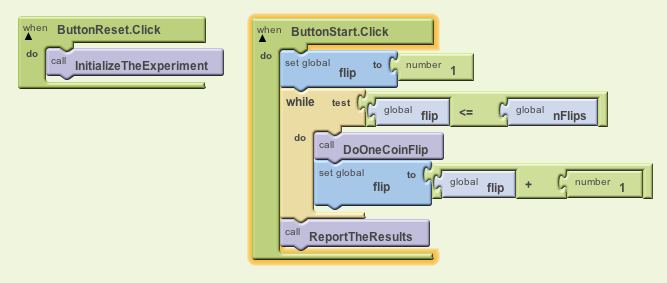
Note that in this app we are not displaying each coin flip, but rather the total number of heads and tails after nFlips coin flips.
One reason for not displaying each flip is that we can't update the app's interface from inside the loop. Once the app enters a while loop it cannot respond to events and it cannot handle requests such as setting the LabelHeads.Text property to a new value.
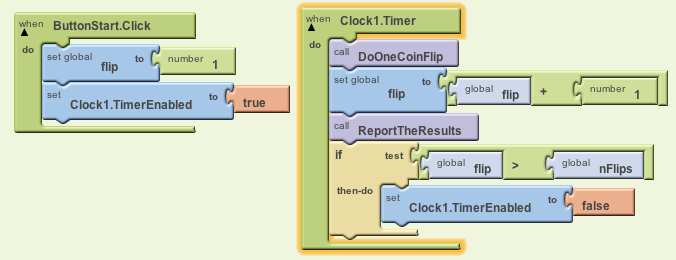
One way to get around this limitation is to use a Clock component and program its Timer loop to do the job of our while loop:
# Remember the implicit timer loop:
While Clock.Timer is enabled  do:
   Wait for Clock.TimerInterval milliseconds
   Generate a Clock.Timer event


# Clock.Timer Event Handler -- Each time the Timer clicks
When Clock1.Timer do:
  DoOneCoinFlip
  Set flip to flip + 1
  if flip > nFlips then-do:
     Set Clock1.TimerEnabled to false
Instead of performing a while-loop when the ButtonStart is clicked, we
now just start the timer loop:
Here's the source code. You can download it as a zip file, save it on your computer. Then use MyProjects > More Actions > Upload Source to upload it in App Inventor. You will need it for this week's homework.
Download the APK file by pointing your Barcode Scanner app (available for free on
the Android Market) to the following QR Code:
Modify the source code of this app to conduct a similar experiment on a three-sided coin, where a "fair 3-sided-coin is a coin that is thick enough that it lands on heads, tails, and sides with equal probability."