In this lesson we will focus on software engineering principles -- i.e., the art and science of designing and building an app. We will briefly describe some best practices aimed at instilling good coding habits. If you adopt these ideas, you will find programming much more enjoyable and less frustrating.
At the end of the lesson we will try to debug a buggy version of the FairCoin app that we developed last time.
User-centered design is the practice of involving the end-users in the app development process.
Apps should solve real problems for real people. It only rarely happens (mostly in movies) that "If you build it they will come."
Use the design we developed in the Fair Coin Experiment as a model.
Build a simple prototype that you can show to end-users and advisers. Ask for feedback.
The following steps should be repeated on very small -- 1 or 2 statements -- portions of your app.
The biggest mistake that beginners make is writing too much code and then getting overwhelmed with the bugs that result.
If you write a tiny bit of code, it is easy to find where the bug -- it's in that tiny bit of code!
Break your app up into procedures. This will help:
Just as we have done on several occasions already, it is often useful to trace your code by hand. Write down a table with columns for each of the variables that you want to keep track of. Then trace step-by-step through your code and compare the result with the expected result.
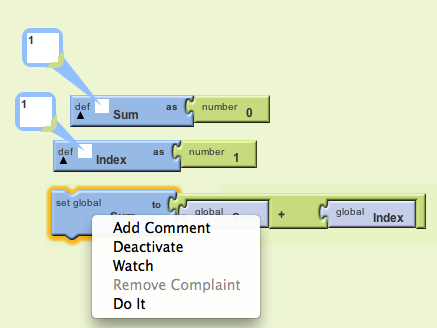
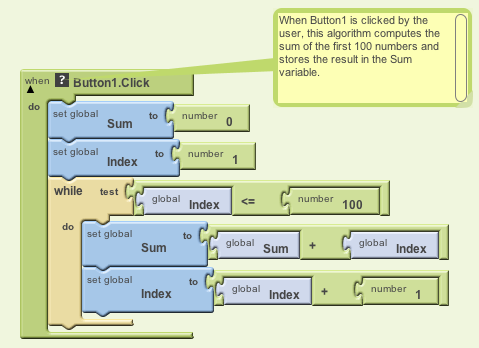
Use comments to clarify and document your code. App Inventor
lets you "Add a Comment" to any code block by right-clicking on it.
NOTE: This is a requirement. Part of your project grade will be based on how well you document your code.
Program bugs are just a fact of life. They exist in all programs and they are created even by the greatest and most experienced programmers.
Detective work: Finding and fixing bugs can be an enjoyable activity if you approach it like a detective:
App Inventor lets you watch variables and lets you test indiidual blocks (do it). Just right click on the block or the variable.
NOTE: You have to have the app connected to the emulator or
a phone for this to work.